Math Blog
This week, I chose to continue working on the save system, this time adding a debug menu into the game to make editing save data for development and debugging easier. To do this, I needed to use Data analysis and Interpretation (Standard: Data, Statistics, and Probability) by categorizing the save file’s data into organized groups — Shrines Completed, Main Weapons, Secondary Weapons, and DeathBag — and representing each value with an appropriate UI element (checkboxes for booleans, spinners for Vector3 coordinates, and a dropdown for string values). This required interpreting the structure of the JSON save data and translating it into a visual format that is readable and interactable during development.
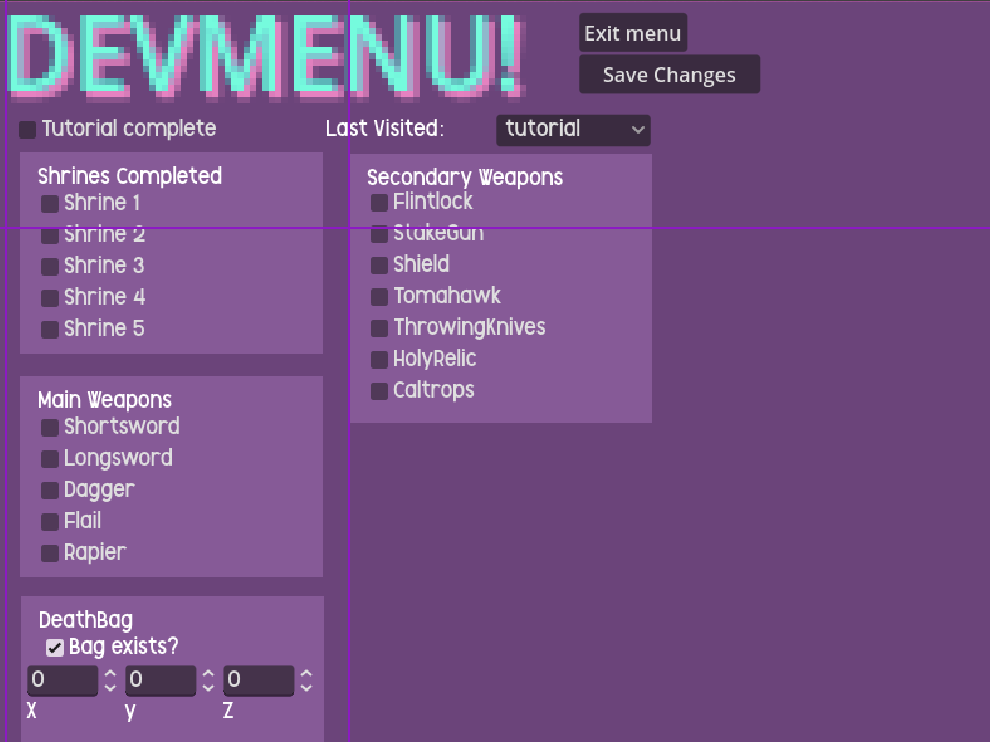
(The Debug menu when viewed from within the Godot editor)
When implementing the save functionality of the menu, I applied Algorithmic Decision-Making and Boolean Algebra (Algebra and Functions) to validate and serialize the data collected from the UI before writing it to the save file. Each input had to be evaluated and converted into the correct data type before being passed to the save functions built last week. Along with this, when reviewing my code that checked the compatibility of the save file from last week, I found an error that had to be fixed with another boolean expression. There was an error, where in previous versions of the game, the save data did not include a “Version” that could be checked, and as such, if the function attempted to validate the save file, it would break the function, and not allow the player to understand if the save was out of date or not, potentially corrupting their save file. To fix this, I added a boolean statement that checks whether the dictionary contains the “version” key, and determines the outcome of the function based on whether that returns true or false.
(The updated compatability checker)
 Isaac Carman's Work&Math Blog.
Leave a comment